
Notes & study
Lecture and study notes
Convert notes into a visual structure for review, comparison and revision.
Essay planning
Map out arguments, supporting points and source notes in a structured format.
Text to Mind Map
A keyboard-first outliner — like the outline tools you already use, but every line you type becomes part of a visual mind map.
Text-first editing · Visual mapping · We don't store your data
Privacy
Text to Mind Map is built so your work stays yours. Documents live in your browser, not on our servers — there is no account to create, and nothing to hand over.
No account required
Open the app and start working immediately. No sign-up, no profile.
No server uploads
Text and maps are processed in your browser. We never receive your content — nothing is sent to a server for parsing or rendering.
Back up to your own Google Drive
Sign in with Google when you want a backup, and a copy is written straight to your own Drive — not ours. You choose when to sync, export or clear your data.
Most mind mapping tools make you draw first and think second — placing shapes and drawing connectors gets in the way of fast thinking. Text to Mind Map flips that: writing is the primary action, and the map is a by-product of a structure you already have.
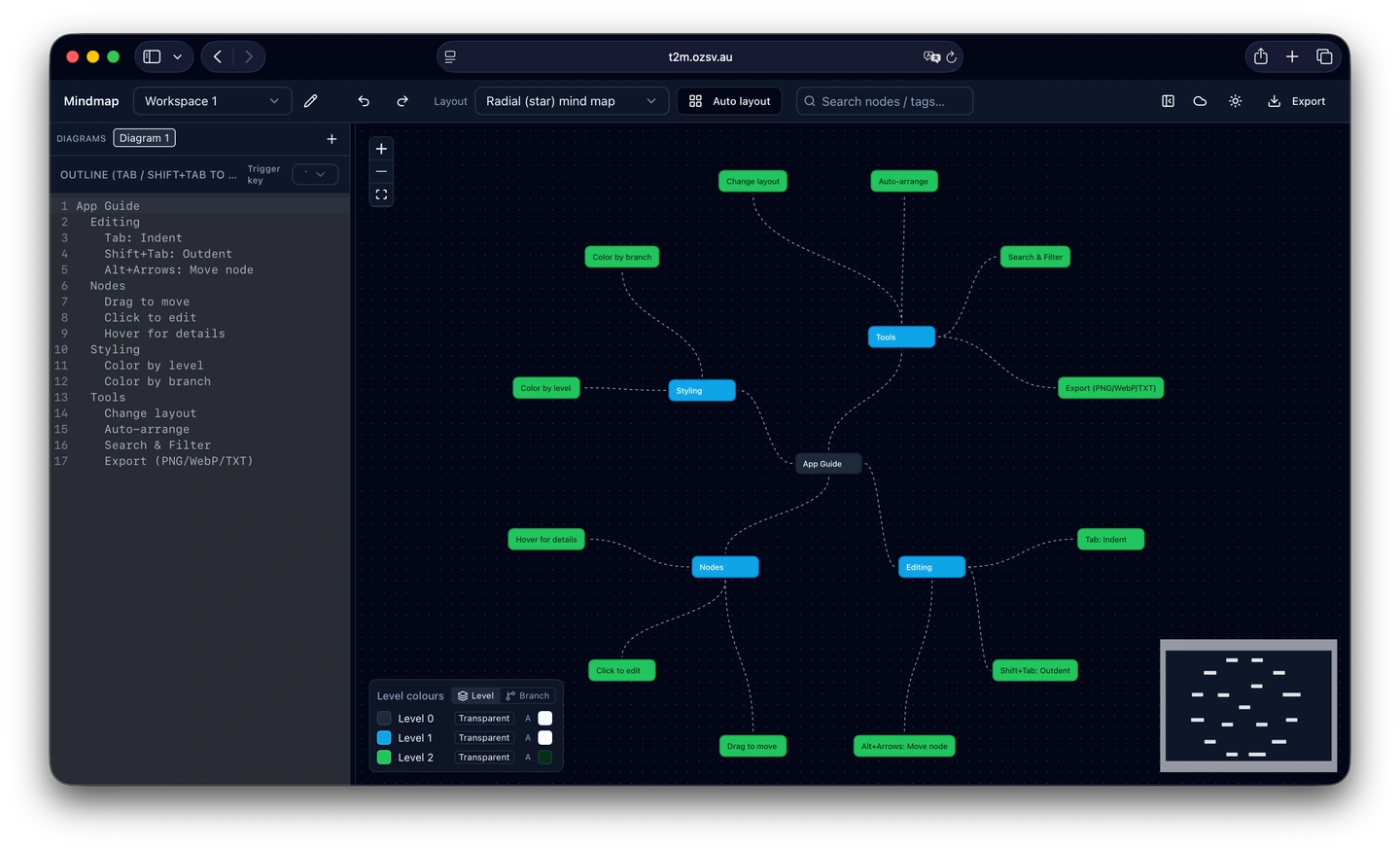
Text on the left, a live map on the right — the outline and the map stay in sync as you type.
Preview
Tab to indent, Enter for a new sibling, Shift+Tab to outdent. The outline and the map update together as you type.
Tools for turning written structure into a clear visual map.
Use Tab to create a sub-node, or Shift+Tab to move back a level while outlining.
Attach context to nodes with details that support planning, research and documentation.
Switch between supported map and tree layouts to suit the structure of your content.
Reorganise the map by dragging nodes into the structure that best reflects your work.
Adjust branch and level colours to make larger maps easier to scan.
Organise work into dedicated spaces and use undo or redo while editing.
Export maps to text, JSON or image formats for practical reuse.
Useful for turning notes, plans and structured thinking into visual form.
Lecture and study notes
Convert notes into a visual structure for review, comparison and revision.
Essay planning
Map out arguments, supporting points and source notes in a structured format.
Project scoping
Outline requirements, adjust scope and export structured outputs for documentation.
Knowledge bases
Organise concepts, references and related decisions as a visual map.
System and flow diagrams
Map out code structures, API endpoints or user journeys with clear tree diagrams.
Content planning
Organise outlines, pillars and research notes in one visual structure.
Five steps from a blank page to a map you can export.
Open the editor and write your central idea.
Press Enter for a new line, Tab to create a sub-node, and Shift+Tab to outdent.
Select a node to review or add supporting details.
Drag nodes to change hierarchy, adjust colours and pick a suitable layout.
Export as an image, JSON or text file when the map is ready.
Documents live in your browser, not on our servers. We don't receive or store your content — you can optionally back it up to your own Google Drive.
The app is free to use. Reasonable limits may apply so the service can stay available for everyone.
Sync runs entirely in your browser — after you sign in with Google, your workspace is written straight to your own Drive using Google's API. It never passes through our servers.
Sign in with Google and use Sync to push a copy to your own Google Drive, then pull it down on another device. You can also use the export options to save a copy manually.
Start with text, shape the structure and export a visual map when it is ready.